Page 1 of 1
No adapters found
Posted: Wed Nov 04, 2009 6:16 pm
by chivopunk
I'm new to vistumbler, i just downloaded it and installed on my laptop, HP pavilion 9075la with windows xp media center edition, when i clicked on the interface tab, it shows just "no adapters found", and i haven't found a way to manually look for it
Re: No adapters found
Posted: Wed Nov 04, 2009 8:16 pm
by ACalcutt
does vistumbler seem to take a long time to load?
you may have a wmi issue like a friend of mine had. look here and see if this helps--->
http://forum.techidiots.net/forum/viewt ... f=11&t=184
Re: No adapters found
Posted: Wed Nov 04, 2009 9:06 pm
by chivopunk
Hi, thanks for the quick reply, did all the everything on the other post, nothing has changed, same problem remains, as to your question if vistumbler takes too long to load? Not at all, it starts up within a second.
Re: No adapters found
Posted: Wed Nov 04, 2009 10:39 pm
by ACalcutt
Can you try running the attached test script. (Enum_Network_Adapters.vbs in Enum_Network_Adapters.zip)
This script lists all network adapters like this
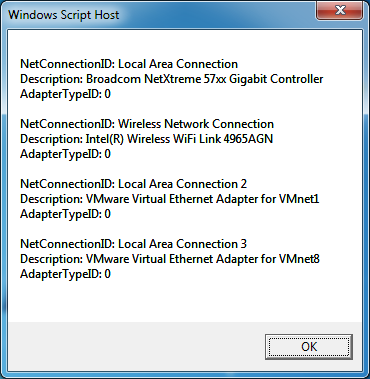
- enum_adapters.png (32.8 KiB) Viewed 12660 times
Do you get any results or any errors when you run this?
Re: No adapters found
Posted: Wed Nov 04, 2009 11:23 pm
by chivopunk
this is what i get when i run the script
NetConnectionID: local area network
Description: Intel(R) PRO/1000 PL Network Connection
Adapter typeID:
NetConnectionID: wireless local area network
Description: Intel(R) PRO/Wireless 3945ABG Network Connection
Adapter typeID: 0
NetConnectionID: 1394 Connection
Description: 1394 Net Adapter
Adapater TypeID: 0
Re: No adapters found
Posted: Wed Nov 04, 2009 11:40 pm
by ACalcutt
you know, after re-reading your post I noticed you are using xp (missed that the first time)
Vistumbler is not really made to work with xp. It does have some support for xp (minimum XP SP2), but only in native wifi mode (and native wifi mode does not work well at all in xp).
The test I had you do would have only been relevant if you were using netsh mode (non native wifi, vistumblers default in vista/window 7). If it makes you feel any better it looks like your wmi is working properly

-------------------------------------
That said, I can still try to help get it working
Are you running XP SP2?
Is (Options --> Use Native Wifi) checked?
Re: No adapters found
Posted: Wed Nov 04, 2009 11:42 pm
by chivopunk
i see, does any of the other previous version work on xp?
Re: No adapters found
Posted: Wed Nov 04, 2009 11:50 pm
by ACalcutt
basically vistumbler was made to get information from the netsh command "netsh wlan show networks mode=bssid" which was made available in vista. Because original versions of vistumbler required that command there was no xp support from the beginning. Later, when I added native wifi mode, we did get some support for xp (though for some reason it takes 5 seconds per loop when scanning...which makes the program run really bad)
everything besides scanning works fine in xp (like importing/exporting/mapping to kml/gps), but since it is a wifi scanner...i don't really consider it xp compatible
Re: No adapters found
Posted: Wed Nov 04, 2009 11:52 pm
by chivopunk
again thanks for the replies! U have been really helpfull!