Page 1 of 1
Pop-up Windows in Vista
Posted: Mon Oct 20, 2008 10:20 am
by Freebe
OK as stated i have a Problem with Vista (32) bit
Seems that the new Ver . ( 9.0_Beta1 ) on my Vista is giving me Problems
The Ver ( 8.1 ) never give me this Problem. Some thing changed ? for shure. but what ?
Seems not all have this Problem ( or not ) told of it.
Problem is i can't get rid of the Microsoft window. It always stays in front of the Vistumbler Programm, and it should after a few times disapear.
Also i have a difference in the Signal ( % ) from Vistumbler to that in the Window from Realtek. Not just the ( % ) but the amount of AP(s) found. ?
ie. 18 AP(s) in the Vistumbler window and only 10 in the Realtek window. Why this is i don't know.
Freebe
Re: Pop-up Windows in Vista
Posted: Tue Oct 21, 2008 5:00 am
by ACalcutt
When you used 8.1 did you use the network refresher (it was in Extra --> Start refreshing networks). I put it on by default in 9.0 beta, but it needed to be turned on in 8.1
Re: Pop-up Windows in Vista
Posted: Tue Oct 21, 2008 6:23 am
by Freebe
OK. will check it out. and give you feedback
Re: Pop-up Windows in Vista
Posted: Tue Oct 21, 2008 9:11 am
by Freebe
OK. I found that and set it to OFF now i don't get the window anymore ( Thats OK. for me ) What i don't understand is that the window disapears on your PC and stays infront on mine. But there are a lot of things that i don't understand

I will call it up fron the Icon botton right if i need it.
Re: Pop-up Windows in Vista
Posted: Tue Oct 21, 2008 9:27 am
by ACalcutt
So if you leave that "Connect to" window open and then click the vistumbler window the connect to window is coming back to the front? (closing it will always make it come to the front again)
Basically what my program does is first checks if the vistumbler window is open. If it is open it refreshes the network and is supposed to bring the vistumbler window back to the front.
This is the code behind that function
Code: Select all
Func _RefreshNetworks();Automates clicking the refresh button on the windows 'connect to' window
	If $Debug = 1 Then GUICtrlSetData($debugdisplay, '_RefreshNetworks()') ;#Debug Display
	If WinActive($Vistumbler) Then
		$ActivateVistumbler = 1
	Else
		$ActivateVistumbler = 0
	EndIf
	If $Scan = 1 And $RefreshNetworks = 1 Then
		If TimerDiff($RefreshTimer) >= $RefreshTime Then
			If WinExists($Text_ConnectToWindowName) = 0 Then
				Run("RunDll32.exe van.dll,RunVAN")
				$RefreshWindowOpened = 1
			EndIf
			ControlClick($Text_ConnectToWindowName, "", $ConnectToButton)
			$RefreshTimer = TimerInit()
		EndIf
		If WinActive($Text_ConnectToWindowName) And BitOR($ActivateVistumbler, $RefreshWindowOpened) Then
			WinActivate($Vistumbler)
			$RefreshWindowOpened = 0
		EndIf
	EndIf
EndFunc   ;==>_RefreshNetworks
If i would have to guess the problem lies here
Code: Select all
If WinActive($Text_ConnectToWindowName) And BitOR($ActivateVistumbler, $RefreshWindowOpened) Then
When it tries to bring vistumbler back to the front it first check if the "Connect to" window is open. If your language pack does not have the correct "Connect to" window name then it will not try to bring vistumbler back to the front. (see here for a description of the ConnectToWindowName setting
http://forum.techidiots.net/forum/viewt ... &t=78#p214 )
To fix this you will need to modify the language pack file and put the proper ConnectToWindowName in there. It is under the [GuiText] category. (then reload the language file)
Re: Pop-up Windows in Vista
Posted: Tue Oct 21, 2008 9:42 am
by ACalcutt
What language is your version of vista?
Re: Pop-up Windows in Vista
Posted: Tue Oct 21, 2008 10:05 am
by ACalcutt
actually i just found a bug. when a language pack is loaded it was not changing the ConnectToWindowName. It was staying the English translation no matter what.
I will fix that in the next release. untill then you can try to change it in (Options --> Auto Save / Auto Sort --> "Connect to" window name)
Re: Pop-up Windows in Vista
Posted: Wed Nov 26, 2008 2:22 pm
by Freebe
OK, Thanks for the reply on this one. Have it running stable now and call it wheni wan't it.
Using the Vistumbler is getting better all the time.

Would be nice to see the in-use line in color

but that i must put in the correct box, and not here.
Thanks Freebe.
Re: Pop-up Windows in Vista
Posted: Sun Nov 30, 2008 8:54 pm
by Guido
I also constantly get this network popup in Dutch version of Vista premium.
Only way to stop this popup is by stop scanning with vistumbler.
Re: Pop-up Windows in Vista
Posted: Sun Nov 30, 2008 11:01 pm
by ACalcutt
You are using the dutch language pack right?
You can also turn off the network refresher (Options --> Auto Refresh Networks) (Opties --> Refreshing Networks) to stop the window from poping up
The reason the network popup is showing up is because the window text must be wrong in the dutch language pack. you can change this text in the settings (Insellingen --> Automatisch opslaan / Automatisch sorteren --> "Verbinden met" venster titel). The text should match the text at the top of the connect to window.
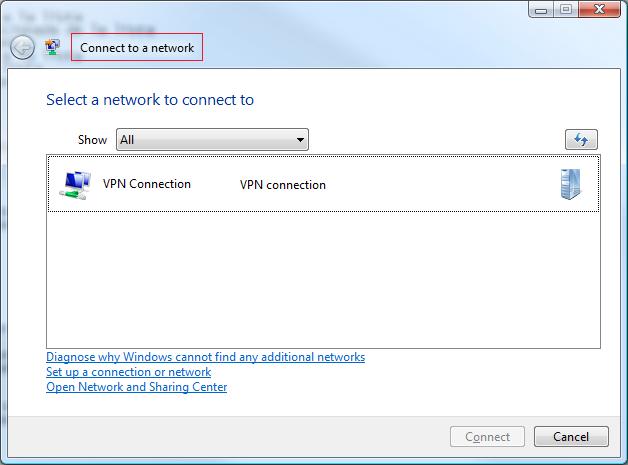
If you find that the text is incorrect, please let me know what it should be