Page 1 of 1
No graph shown in Vistumbler
Posted: Thu Sep 11, 2008 2:01 pm
by blomic
I have a problem with Vistumbler not showing any graph, pressing the "Graph1" key.
There are AP's listed with signal strength varying depending on distance to the AP which is good.
I can see the signal strength graph for the AP that I have been monotoring using the menu "Extra" + "See graph (Phil's PHP version). See below link for my access point Almhagen.
http://www.randomintervals.com/wifi/?SS ... 0-80%20-80
Anyone knows how to solve this?
Thanks,
Michael
Re: No graph shown in Vistumbler
Posted: Thu Sep 11, 2008 10:04 pm
by ACalcutt
hmm...that is weird...if it getting signal it should graph.. what version are you using? what language is your version of vista?
does this alpha version graph? (
http://forum.techidiots.net/forum/viewt ... f=26&t=126
)...it works differently than the released version
Re: No graph shown in Vistumbler
Posted: Fri Sep 12, 2008 4:00 am
by blomic
I am using version 8.1 of Vistumbler and Windows Vista Business Swedish version.

The MDB version gives the same bad result.
I have a HP Compaq 6910p computer with a built in Intel Wireless WiFi Link 4965 AGN Mini PCI card.
/Michael
Re: No graph shown in Vistumbler
Posted: Fri Sep 12, 2008 9:26 am
by ACalcutt
Hmm...its graphing its just putting it all to 0 percent. this seems like it could be 2 things...the data is equal to zero, or my multiplyer number didn't calculate right.
download Vistumbler_test.exe (in Vistumbler_test.zip) and put it in your vistumbler 8.1 directory. run it, view the graph, and take a screenshot of the debug data in the upper right
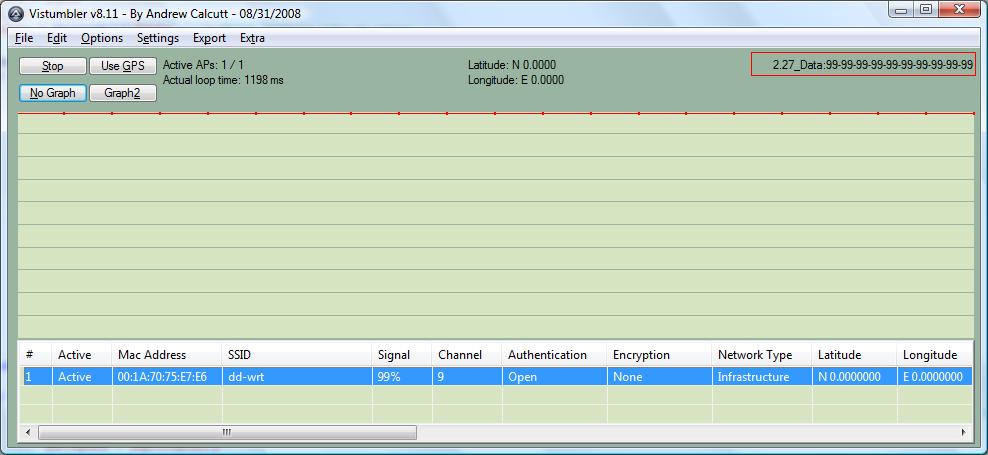
- gdebug.jpg (64.9 KiB) Viewed 15752 times
Re: No graph shown in Vistumbler
Posted: Mon Sep 15, 2008 2:36 pm
by blomic
I installed the Vistumbler_test.exe software with the following output:

/Michael
Re: No graph shown in Vistumbler
Posted: Mon Sep 15, 2008 2:58 pm
by blomic
I installed a Proxim 802.11 a/b/g ComboCard (8481-WD) and disabled the internal Intel Wireless WiFi Link 4965AGN too see whether the problem was radio specific.
The result was the same... No graph shown.
So, the problem probably has nothing to do with the card.
/Michael
Re: No graph shown in Vistumbler
Posted: Mon Sep 15, 2008 4:36 pm
by ACalcutt
No, the information is there so i doubt its the card...
but from the picture it seems like it should be working. The multiplier is 2.76 pixels ...and its getting data of 99%... I'll look into it more and seem if i can find another reason
Re: No graph shown in Vistumbler
Posted: Mon Sep 15, 2008 4:41 pm
by ACalcutt
I see what the problem is... your signals seem like they have a space in them.... I will see if i can figure out why that is
Re: No graph shown in Vistumbler
Posted: Wed Sep 17, 2008 1:30 pm
by ACalcutt
Try this...does this work?
If not could you send me a VS1 file with some data in it
Re: No graph shown in Vistumbler
Posted: Thu Sep 18, 2008 3:02 am
by blomic
Great work!!
Vistumbler now shows the graph when I select graph2.
I am not sure about the differance between graph1 and graph2, but graph1 shows the same zero line, but this time in the middle of the display.
I can post screenshots if you want.
/Michael
Re: No graph shown in Vistumbler
Posted: Thu Sep 18, 2008 1:35 pm
by ACalcutt
ya...could you post that screenshot and a vs1 file...i want to see if i can replicate the problem
-Andrew
Re: No graph shown in Vistumbler
Posted: Fri Sep 19, 2008 3:00 pm
by blomic
Now I understand that Graph2 shows the variation of the signal strength.
Both Graph1 and Graph2 present correct data using the the latest fix (Vistumbler_test.exe)
Problem with No graph shown is solved.
Thanks,
Michael
Re: No graph shown in Vistumbler
Posted: Fri Sep 19, 2008 4:23 pm
by ACalcutt
Ok...i will add that change to the next version
Thanks